🧩 v1.10.1: Your Overview, Your Way. Export Your Budget, Money Moves History
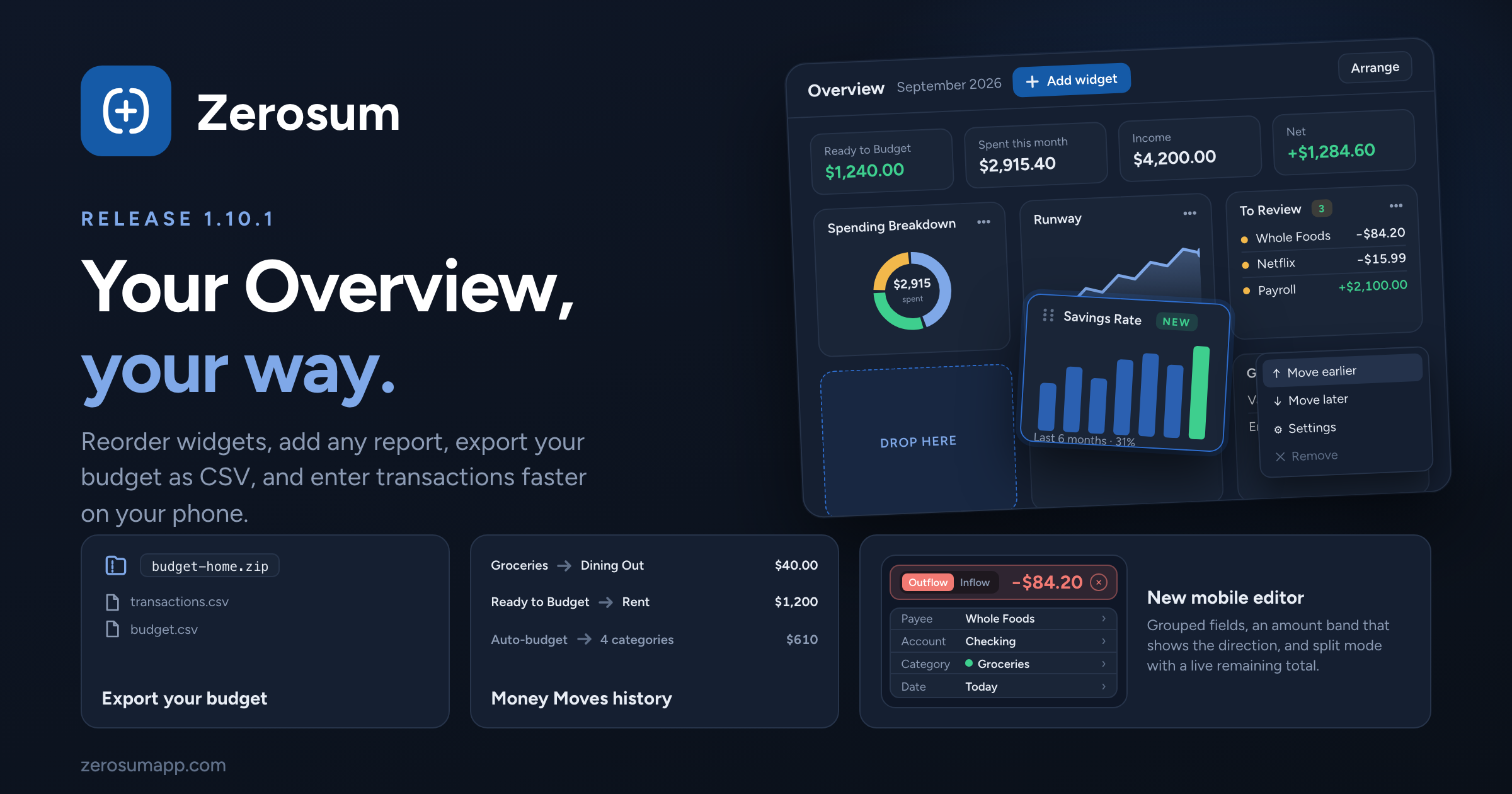
The Overview is now yours to arrange: reorder widgets, add any Analytics report, remove what you don't need. Alongside it: export your whole budget as CSV, a Money Moves history in the side panel, a redesigned mobile transaction editor, and a round of improvements to the budget table, bank sync and analytics.
🧩 Build your own Overview
New: reorder, add and remove widgets. Every card on the Overview has a menu: Move earlier, Move later, Settings, Remove. Add Widget offers the whole Analytics catalog (Net Worth, Savings Rate, Cash Flow, Runway and the rest) next to the Overview's own Snapshot, Plan Ahead, Spending Breakdown, Recent Cash Flow, To Review, Upcoming and Goals cards. Arrange lets you drag the whole order at once, and Reset Layout takes you back to the default.
Snapshot tiles are yours too. Turn each of the four hero tiles on or off.
Dashboards got the same menu. Move earlier / Move later on every dashboard widget, without opening Arrange.
📦 Export your budget
New: Export data. One click in the budget menu (and on each budget's menu in Manage Budgets) downloads a zip with two files:
transactions.csv, your full register, andbudget.csv, one row per category and month with Carried Over, Budgeted, Activity and Available, plus a Ready to Budget line for every month. Built on your device, ready in seconds.
📊 Budget table
New: Money Moves in the side panel. A scoped history of where money went: the whole month in Month Overview, or just the selected categories, saved view or search. Undo stays in History.
Auto-budget shows its numbers before you commit. Each option in the Auto-budget menu now shows the net change it would make to the categories in scope, whether that is the whole month, a search, a view or a selection.
Avg spent and Avg budgeted look back 12 months instead of 6, so annual and seasonal expenses are part of the average.
Search scopes everything. Searching the budget narrows the overview totals and Auto-budget to the categories shown. Favorites step aside while you search so each category appears once.
Mobile: long-press to select categories. Tap to add more, then Done. The selection checkbox matches the transactions register, and select mode ends when you deselect the last row.
→ Budgets & Categories · Side Panel
✏️ Transactions
Redesigned mobile editor. The add and edit drawer groups fields into cards (Payee, Account, Category, Date; then Receipt, Note, Tags; then status and recurring) under an amount band that turns red for outflows and green for inflows. Split mode is one card with a live remaining amount on the numpad. Loan payment and adjustment sheets follow the same design.
New: search by category group. Type a group name in the search box and Zerosum offers the whole group, with a count of the categories underneath.
Import and export from your phone. The account menu on mobile now has Import transactions and Export CSV. On iPhone the Files picker opens directly, and every file type is selectable.
Fixed: same-day scheduled rows in an account's forecast were ordered arbitrarily, so the running balance could dip mid-day.
→ Transactions · Searching transactions
🏦 Bank sync and file imports
New: Flip amounts for SimpleFIN. A per-account switch on the Bank Sync page for banks that report debits and credits backwards.
New: "Don't import memos" for OFX, QFX and QIF files, next to Swap payee and memo and Flip sign. For banks that put boilerplate in every memo. Check numbers still come through.
→ Bank Sync · Importing Transactions
📈 Analytics and loans
Income Flow can include tracking accounts. Pick them in the account filter and their direct activity counts, grouped by payee. Useful for interest earned in off-budget savings.
Loan forecast gained a Baseline line. A dashed minimum-payment-only line across the whole timeline, so hovering any past month shows how far ahead of the minimum you are. Tooltips only list the lines that apply.
Thank you for being here. ❤️