🔁 v1.11.1: Carry Overspending by Category, Compare Three Months, Colorblind Mode
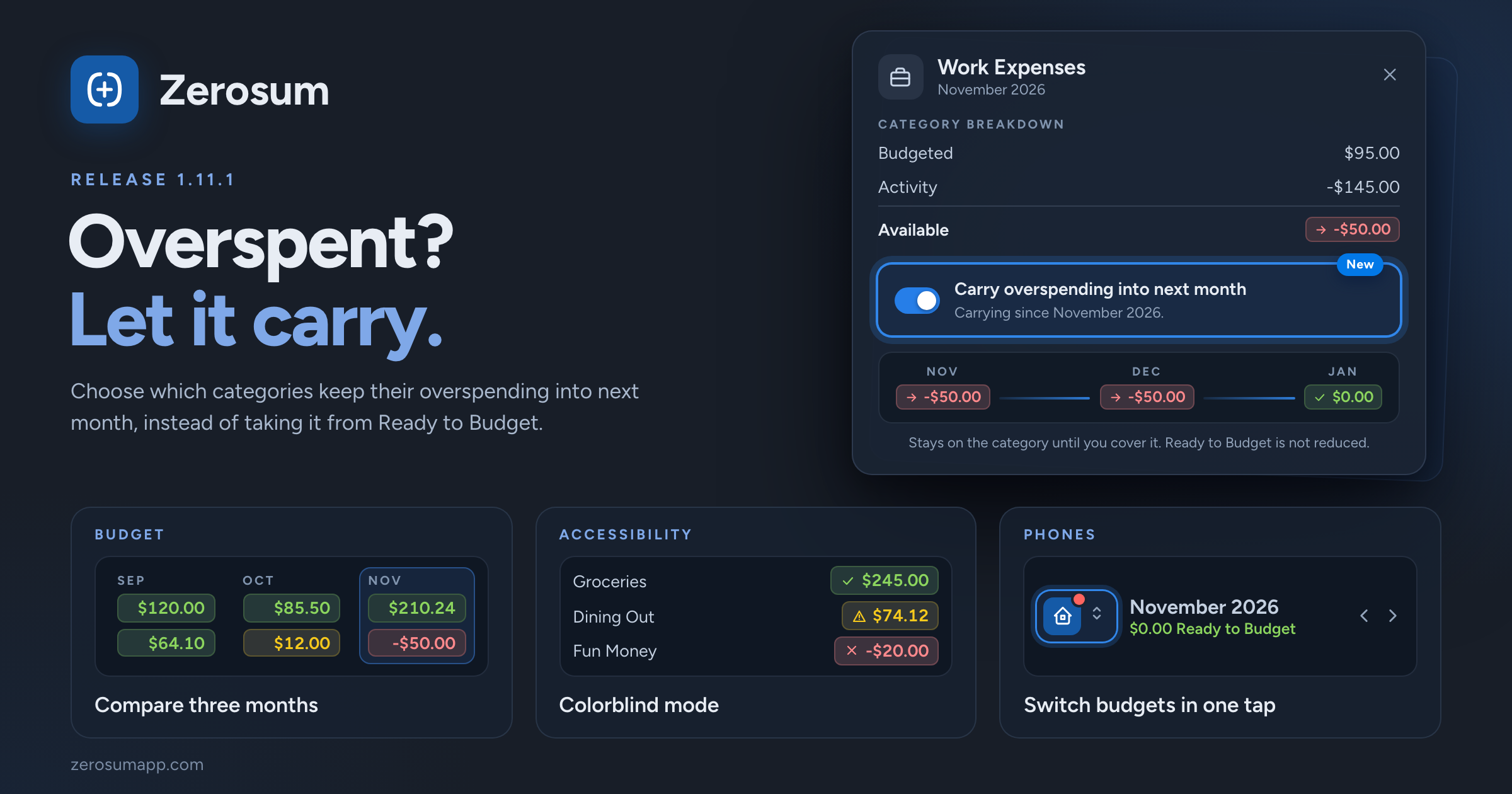
Overspent? Let it carry. Our last update was only three days ago, but two things in this one have been in the works behind the scenes for a while: carrying overspending category by category, and a colorblind mode. Both are ready, so here they are. You can also compare three months side by side, and the app is quicker to open.
🔁 Carry overspending, category by category
- New: each category chooses. With Carry over negative balances on in Settings → Budgeting, open a category and turn on Carry overspending into next month. Its overspending stays on the category next month instead of coming out of Ready to Budget. Handy for expenses you'll be reimbursed for, or a bill you're catching up on.
- It starts from the month you're viewing and stays on until you turn it off. Earlier months never change, and the line under the switch tells you since when it has been carrying.
- Easy to spot: a category that carries shows a small arrow on its red Available amount.
- Already use the setting? Nothing changes. Every category you have keeps carrying, exactly as before. You can now turn it off for the ones you don't want. New categories start with it off, so turn it on for each one that should carry.
- Never used it? Nothing changes, and nothing new appears on your screen.
- Coming from Actual? Categories you set to roll overspending over now keep carrying after you import.
→ Carry Over Negative Balances
👁️ Status you can read without color
- New: Colorblind mode. Turn it on in Settings → Appearance to show a symbol beside every Available amount and goal: a tick for funded, a triangle for underfunded, a cross for overspent.
- Improved: bank sync status now differs by shape as well as color: a dot for syncing, a triangle for a warning, a crossed circle when it needs reconnecting.
📅 Compare three months
- New: on a computer, View → Compare months can now show 3 months side by side. With Link month navigation on, they move together.
📱 On your phone
- New: switch budgets in one tap. With more than one budget, the open budget's icon sits beside the month on the Budget page. Tap it to switch, or to reach budget settings, members and import. A dot tells you when another budget has transactions to review.
- New: your review count on the app icon. The iPhone app icon now shows how many transactions are waiting for you. Android follows with its next app update.
🧮 Also in this release
- New: the Recent cash flow widget can leave out the month in progress. Open its settings and turn on Exclude current month.
- Improved: Auto Budget shows each change with a plus or minus sign, so it can't be mistaken for the budgeted amount.
- Heads up: Zerosum now needs iOS 16.4 or later, or a recent version of Safari, Chrome, Edge or Firefox.
As always, thank you for the feedback that shaped this one. 💙